
How to get started with SEO: a practical guide to helping search engines understand a website
How a search engine crawls, indexes and shows a site's pages, what is checked first, what is adjusted on each page and which data is reviewed afterwards.

Kryuja Guides
Editorial team
- Published
- Reading time
- 15 min
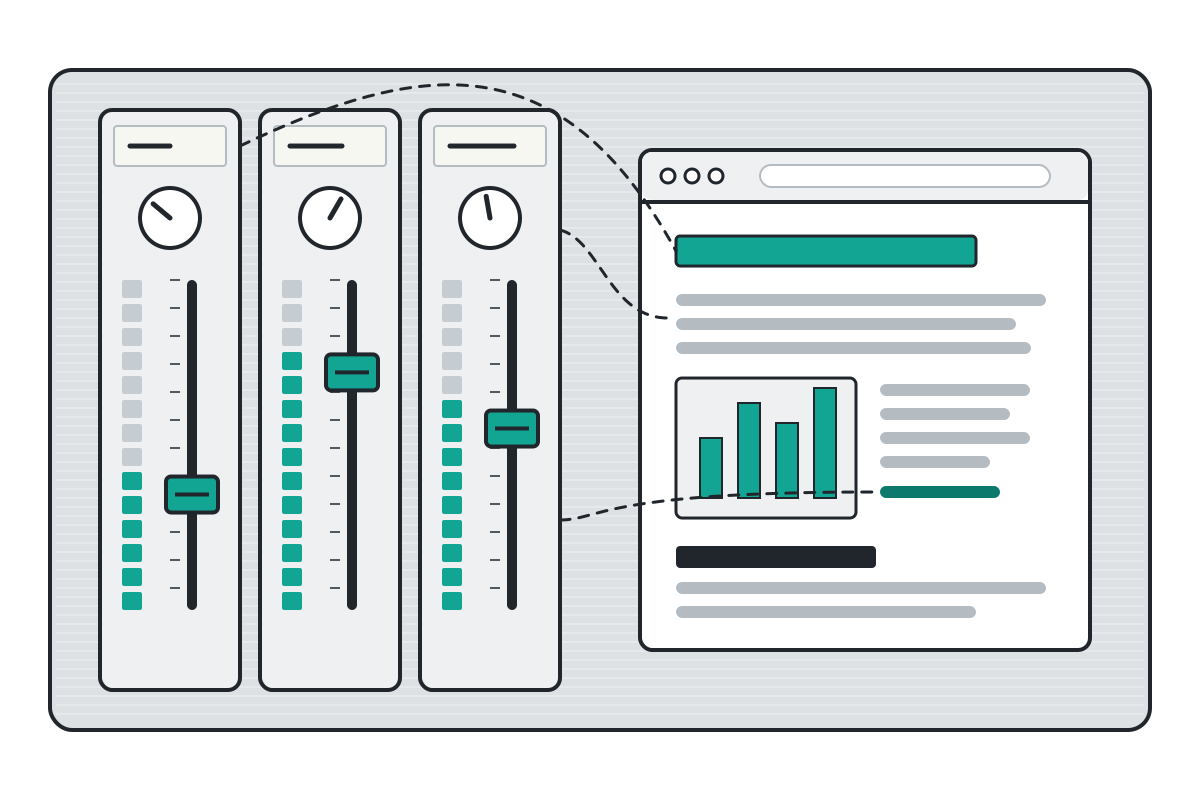
A search engine can only show a page that it has found, read and stored. SEO (search engine optimisation) consists of making those three things easier and of making clear what each page is about. This guide goes through it in order, from the first check to the monthly review.
The example, an illustration, is the website of a bicycle repair workshop at example.com. The sources were consulted on 13 November 2026. No step assures a place in the results: what is adjusted is how easy the site is to understand.
What SEO does
The Google Search Central SEO starter guide (in Spanish) (updated 18 December 2025) defines it as helping search engines understand the content and helping people find the site. According to the in-depth guide to how Google Search works (in Spanish) (same date), the process has three stages, and not every page goes through each one:
- Crawling. A program, the crawler (at Google, Googlebot), discovers addresses through links and sitemaps, and downloads their text, images and videos.
- Indexing. The search engine analyses what was downloaded, decides whether the page is a copy of another one and stores it in its index, a large database.
- Serving search results. When a search is made, it picks the most relevant pages from the index and shows them in a list.
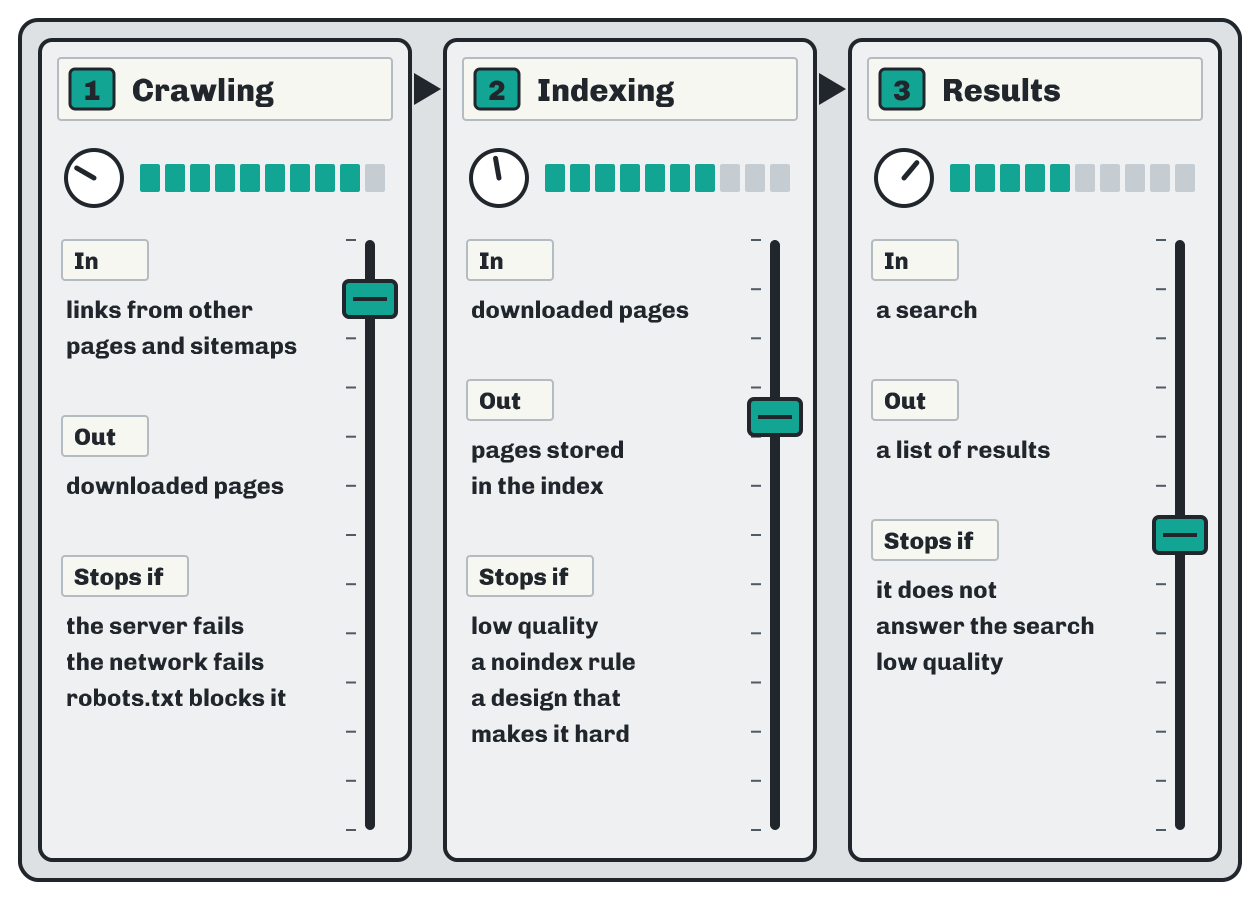
noindex rule or a design that makes analysis difficult stop it. Results: a search goes in, a list comes out; a page is left out if it does not answer the search or is of low quality. The meter levels are illustrative. Source: Google Search Central, “In-depth guide to how Google Search works”, updated 18 December 2025; consulted 13 November 2026.The same guide states that Google does not accept payment to crawl a site more often or to improve its ranking, and that it does not assure that a page will be crawled, indexed or shown, even if the page follows its guidelines.
Is it in the index yet?
The first check needs no tools. According to the starter guide, publishing a site is usually enough for the search engine to find it, and this is verified with the site: operator:
site:example.com
If no page appears, or the important ones are missing, the three requirements on Google’s technical requirements (in Spanish) page are reviewed; according to that page, most sites meet them without realising it:
- the crawler is not blocked;
- the page responds with the HTTP code 200, not with an error;
- it has indexable content: text in a format that the search engine can read.
At the workshop, site:example.com shows the home page, the services and the opening hours; the new page about chain replacement does not appear yet.
Search engines’ own tools
Google Search Console is free and is not needed to appear, according to its getting started guide (in Spanish), but it shows what Google has found. Its first steps are verifying ownership of the site, seeing which pages are indexed, submitting a sitemap and reviewing performance. URL Inspection (in Spanish) gives the index status of a single address, a live test and a crawl request; at the workshop it is used on the chain replacement page.
Bing publishes its own webmaster guidelines and offers Bing Webmaster Tools, with similar functions. The most widely used search engine changes from one country to another; public statistics such as StatCounter Global Stats show which ones are used in each country.
Crawling: the way in
A crawler reaches pages mainly through links. According to Google’s documentation on crawlable links (in Spanish), only an <a> element with an href attribute is followed reliably; Bing’s guidelines also ask for crawlable internal links. At the workshop, the chain replacement page is linked from the services page.
The sitemap
A sitemap is a file, usually XML, that lists the site’s addresses. According to Google’s page about sitemaps (in Spanish), it may not be needed on a well-linked site of about 500 pages or fewer, and it helps more on a large site or on a new one with few external links. Content management systems usually generate it on their own. The sitemaps.org protocol calls for UTF-8, absolute addresses and the <urlset>, <url> and <loc> tags:
<?xml version="1.0" encoding="UTF-8"?>
<urlset xmlns="http://www.sitemaps.org/schemas/sitemap/0.9">
  <url>
    <loc>https://example.com/services/chain-replacement</loc>
    <lastmod>2026-11-13</lastmod>
  </url>
</urlset>
Google ignores <priority> and <changefreq> and uses <lastmod> when it matches the real changes, according to its guide to building and submitting sitemaps (in Spanish). The sitemap is submitted from the “Sitemaps” report in Search Console or with a Sitemap: line in robots.txt.
The robots.txt file
The robots.txt file, at the root of the site, tells crawlers which addresses they may request. It is defined by the IETF’s RFC 9309 (September 2022), with user-agent, allow and disallow rules. An illustrative example:
User-agent: *
Disallow: /testing/
Sitemap: https://example.com/sitemap.xml
Google’s introduction to robots.txt (in Spanish) makes clear that it is not a way to keep a page out of Google: a blocked address can still appear in the results, without a description. RFC 9309 adds that its rules are not a form of access authorisation. To leave a page out, the noindex (in Spanish) rule is used on a crawlable page, or a password.
IndexNow
IndexNow is an optional notice to the participating search engines when an address is added, changed or deleted. Its documentation names Bing, Naver, Seznam.cz, Yandex and Yep among them, and its frequently asked questions make clear that the notice does not assure immediate indexing.
| Item | Figure | Source |
|---|---|---|
| Addresses per sitemap file | 50,000 URLs at most | sitemaps.org (2016-11-21); Google (2026-07-15) |
| Size per sitemap, uncompressed | 50 MB at most | sitemaps.org; Google |
| Length of a sitemap address | fewer than 2,048 characters | sitemaps.org |
| Site that may not need a sitemap | about 500 pages or fewer | Google (2025-12-18) |
| Part of robots.txt read at a minimum | 500 kibibytes | IETF, RFC 9309 (September 2022) |
| Longest life of a cached copy of robots.txt | 24 hours | IETF, RFC 9309 |
| Addresses per IndexNow request | up to 10,000 URLs | IndexNow (consulted 2026-11-13) |
What each page controls
A few elements of each page are read first and can be changed from almost any content management system. Google’s documentation sets no lengths for them: it asks that they describe the page and that they are not repeated across pages.
The title
The <title> is the main source of the title link in the results. Google’s page on title links (in Spanish) (updated 10 November 2026) asks for it to be descriptive, concise and different on each page, with no length limit: the link is cut to the width of the screen. MDN (in Spanish) observes that the first 55 to 60 characters are usually shown, so the important words go first. At the workshop, “Services 3” becomes “Bicycle chain replacement: when it is done and what is checked”.
The meta description
It is a summary placed in the page’s header (<head>). According to Google’s page on snippets (in Spanish), the text under the title comes mainly from the content and sometimes from the meta description. It has no limit; the starter guide suggests one or two sentences, different on each page.
Headings
From <h1> to <h6>, they put the text in order. The W3C headings tutorial asks for them to be nested without skipping levels, so that they can be navigated with a screen reader, and Bing asks for a logical hierarchy. Google’s guide gives no importance to their number or their order.
The address
Google’s guide to URL structure (in Spanish) recommends words in the audience’s language, separated by hyphens: https://example.com/services/chain-replacement says more than https://example.com/index.php?id=3842.
Images and links
Alt text describes an image that carries information; the W3C decision tree shows when a decorative image takes an empty alt. Google uses it to understand the image, according to its documentation on images (in Spanish). The text of a link describes where it leads: “workshop opening hours” says more than “more information”.
Mobile
Google indexes the mobile version of the content, according to its page on mobile-first indexing (in Spanish) (updated 20 February 2026). It recommends a responsive design, with the same content, headings, title and description on mobile and on desktop.
| Element | What it does | What is asked for | Length |
|---|---|---|---|
| Title | Basis of the title link | Descriptive, concise, different on each page (Google) | No limit; about 55 to 60 characters are shown (MDN) |
| Meta description | Possible snippet under the title | One per page, different on each (Google) | No limit; one or two sentences |
| Headings | Put the text in order by level | No skipped levels (W3C); a logical hierarchy (Bing) | Six levels; no ideal number |
| Address | Identifies the page | Words separated by hyphens (Google) | Fewer than 2,048 characters in a sitemap |
| Alt text | Describes an informative image | Short; empty if the image is decorative (W3C) | No set figure |
| Link text | Announces where the link leads | That it describes the destination page (Google) | No set figure |
Content that answers
Google’s starter guide places useful, reliable content made for people ahead of any other recommendation. For the workshop, that means pages that answer what people ask before bringing in a bicycle: when a chain is replaced or what is checked in a tune-up.
The searcher’s words
The guide recommends anticipating the reader’s words, which are not always those of the trade. A mechanic writes “derailleur” and “cassette”; someone searching writes “gear shifter” or “sprockets”. In a ceramics studio, the text says “potter’s wheel” and “pottery”, and the search may be “making clay mugs”. Google Search Essentials (in Spanish) places those words in the title, the main heading, the alt text and the text of the links.
Questions for reviewing a page
Google’s page on creating helpful, reliable, people-first content (in Spanish) (updated 11 November 2026) proposes questions like these, summarised here:
- Does it provide original information or analysis?
- Does it cover the topic completely?
- Does the title describe the content without exaggerating?
- Is it clear where the information comes from?
- Is it written for people rather than for a search engine?
What needs no attention
According to the same starter guide, these are not worth the time:
- the
keywordsmeta tag, which Google Search does not use (meta tags (in Spanish)); - a number of words: there is no minimum or maximum;
- the number and order of the headings;
- keywords in the domain name.
A page that answers a specific question, in the words of whoever asks it, covers the part of SEO that Google’s documentation puts first.
Speed and experience
Core Web Vitals measure the real experience of a page. web.dev (updated 31 October 2024) defines three:
- LCP (Largest Contentful Paint): how long the largest content element takes to appear. It measures loading.
- INP (Interaction to Next Paint): how long the page takes to respond to a tap, a click or a key press. It measures responsiveness.
- CLS (Cumulative Layout Shift): how far elements shift without anyone moving them. It measures visual stability.
Their bands are in web.dev’s article on the thresholds and are measured at the 75th percentile of each page’s loads, separately on mobile and on desktop.
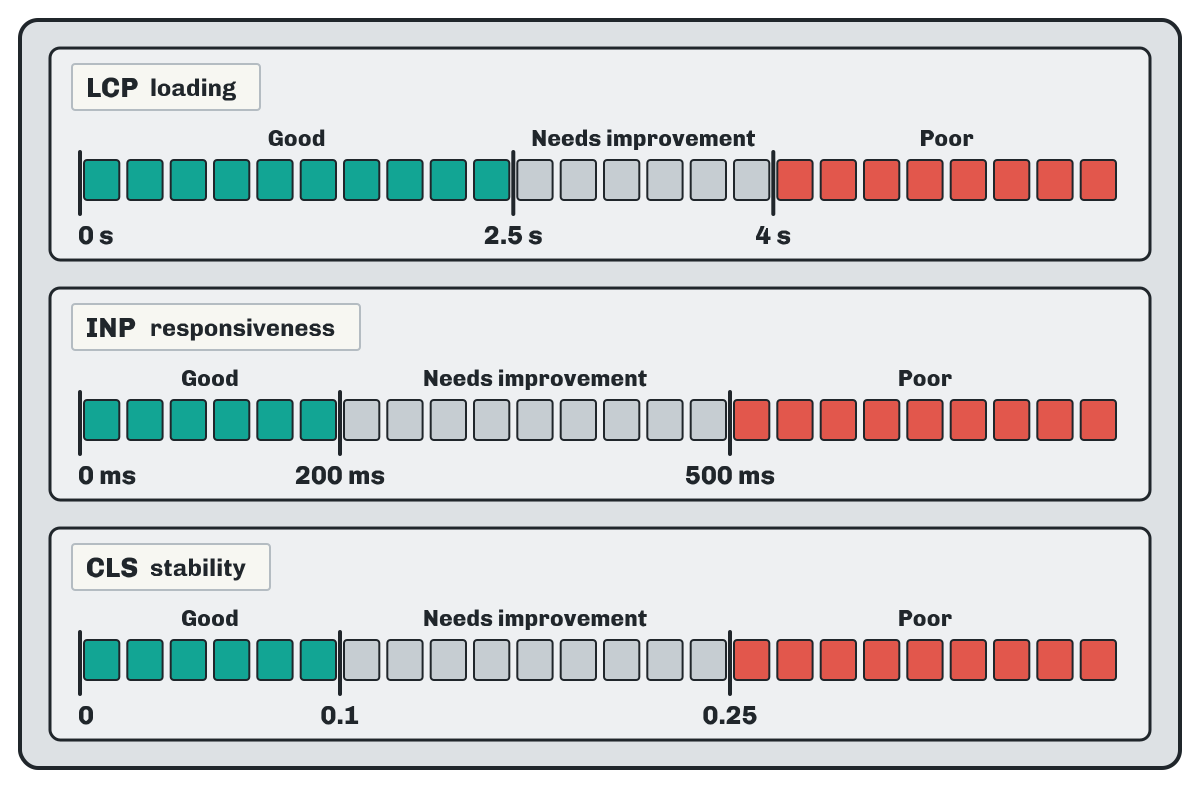
INP replaced FID in 2024, and web.dev states that stable metrics do not change more than once a year. Google’s page on Core Web Vitals (in Spanish) explains that its ranking systems use them, but that good values do not assure a good place. Its page experience (in Spanish) page adds other points: HTTPS, comfortable reading on mobile and no intrusive window covering the content.
Field data and lab data
PageSpeed Insights (in Spanish) (information updated 25 July 2025) shows field data, from real Chrome users over the previous 28 days, which a new page may not have yet, and lab data, from a simulated load with Lighthouse. At the workshop, one page of each type is analysed first: the home page, a service and a guide.
Structured data
Structured data gives the search engine explicit clues about a page: that it is an article or an event, for example. According to Google’s introduction to structured data markup (in Spanish), it has to describe what the reader sees, and the recommended format is JSON-LD. The vocabulary is that of schema.org, founded by Google, Microsoft, Yahoo and Yandex and developed by an open community. It is an optional step; an illustrative example:
<script type="application/ld+json">
{
  "@context": "https://schema.org",
  "@type": "Article",
  "headline": "When a bicycle chain is replaced",
  "datePublished": "2026-11-13"
}
</script>
The markup is checked with Google’s Rich Results Test (in Spanish), which accepts a URL or a code snippet, or with the schema.org validator.
What to look at afterwards
The “Performance” report (in Spanish) in Search Console shows the last three months by default, with four figures that are broken down by queries, pages, countries and devices:
- Clicks
- Times someone opened the site from a result.
- Impressions
- Times a link to the site appeared in the results.
- CTR
- Click-through rate: clicks divided by impressions.
- Average position
- The site’s average place in the results in which it appeared.
At the workshop, the view by queries shows which words people arrive with and whether they match the words on its pages.
Why results change
Results depend on hundreds of factors, such as location, language and device. Google’s guide to how Search works shows this with a search for “bicycle repair shops” made from two cities. A single search of one’s own is one case; average position sums up many.
The first four weeks
Illustrative calendar. The split by week belongs to this guide. Only the monthly visit to Search Console, which its getting started guide suggests, and the wait of a few weeks before judging a change come from Google.
- Week 1. A
site:example.comsearch, setting up and verifying Search Console, and an inspection of the home page. - Week 2. Titles, meta descriptions and main headings of the key pages.
- Week 3. Internal links, the sitemap, alt text and a read-through of the site on a phone.
- Week 4. PageSpeed Insights on one page of each type and a first reading of “Performance”.
- After that. One review a month, and a few weeks’ wait before each change is judged.
Common questions
How long does a change take to show?
According to Google’s starter guide, from a few hours to several months; it suggests waiting a few weeks before judging it. A new title is read again within a few days to a few weeks, according to the title links page.
Is a sitemap or Search Console needed to appear?
No. Most sites are found through links. Google states that a sitemap is not mandatory and that Search Console is not necessary to appear; both serve to see what the search engine has found.
How long should the title and the meta description be?
Google sets no limit for either of them and cuts both to the width of the screen. MDN observes that 55 to 60 characters of a title are usually shown, so the important words go at the beginning.
Does robots.txt keep a page out of the results?
No. robots.txt governs crawling, and a blocked address can still appear, without a description. To leave it out, noindex is used on a crawlable page, or a password.
Kryuja Guides
Kryuja Guides is the team that writes Kryuja. It explains search, content, email, social media, advertising and analytics from the documentation it cites, with every fact dated and every example marked as illustrative. When a source changes, the guide is revised and the update date is noted.